Weather and Mood
If you asked how was the whether few weeks ago, I would definetly make my face like this 😔
Well… even now it still not 🙂 So I thought about checking my mood everyday using a simple app. By my mood, I mean how curvy my smile is. Our app shows a smiley face with a greeting. I picked a date that Winter became one of the worst and set it as the start date. And the end date could be somewhere the Summer starts for real (after all this is Michigan I’m talking about).
Let’s program your mood
How about an illustration of your mood for each day with some greeting 🤔

We use SVG (Scalable Vector Graphics) to draw the smiley face. If you are not familiar with SVG… SVG is a light weight, XML-based image format that defines vector graphics in web. Though there are few different ways of using SVG, we will directly use SVG with JSX syntax in our example.
Recently, I started learning React. Why not use it then. In this article, we discuss the use of React functional components and Bezier Curve with SVG Path element.
First, let’s see how to draw a Bezier Curve using SVG Path element. At the beginning (that means a Winter day), the app starts with a sad expression and it grows into a full smile over time. How do we define the depth of the smile? Easy!! This is how it is going to look like. The face A is the smile on the start date and the face B is the middle of the time line. The face C is the end date.

The depth or height (+h or -h) of the smile can be calculated as follows.

We draw the Bezier Curve with M and C commands. Format is as follows.
<svg cx="0" cy="0" height="400" width="400">
	<path d={`M x1 y1 C x2 y2 x3 y3 x4 y4`}/>
</svg>
The M command means “Move” to the absolute coordinates (x1 ,y1). The C command takes three points. The first two points, i.e. (x2, y2) and (x3, y3) define the location of two Bezier curve handles. The last point (x4, y4) is the end of the curve. All these points are absolute values for C (upper-case) command. For c (lower-case), the values will be relative.
For our smile, we define these points with C (upper-case) command as follows.
<path d={`M ${x1} ${y1} C ${x2} ${y2} ${x3} ${y2} ${x4} ${y1}`}/>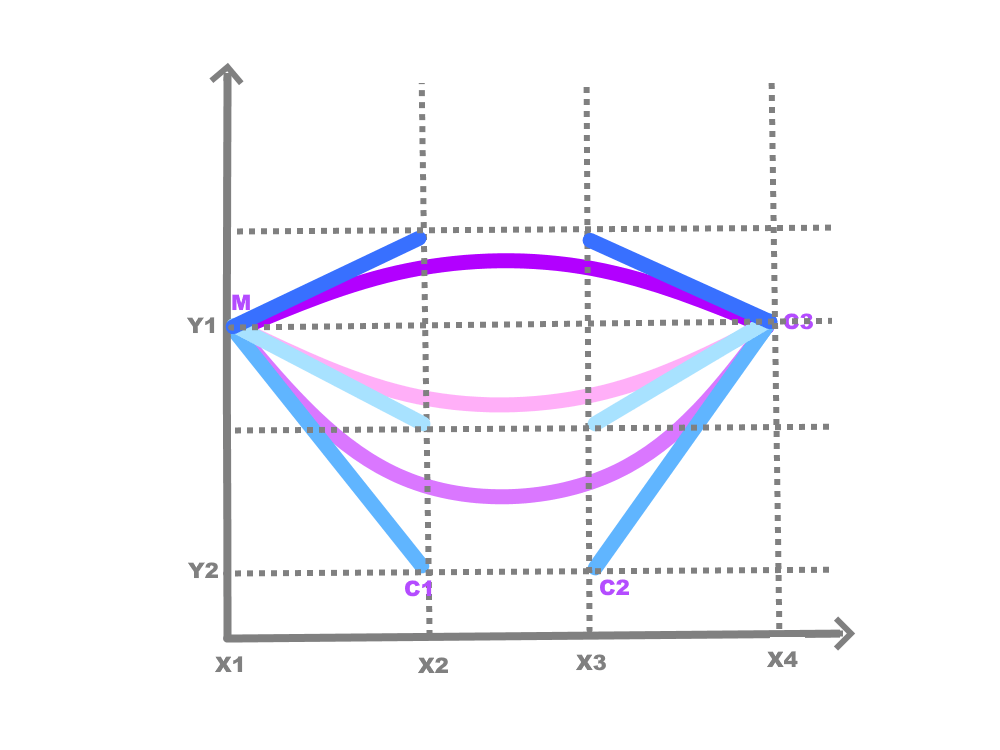
x1 and x4 are constants while x2 and x3 depends on the width (w).
w = h == 0 ? (x4 - x1)/2 : (x4 - x1)/(2 * height)For instance lets say, Start Date is 12/25/2021, and End Date is 04/25/2022. Then Middle date will be 02/23/2022. Duration is 17 weeks and 2 days (i.e.121 days). Per our calculation, h = 61, w = 1.229 and the points for the same date in each month will look like as follows.
12/25/21→ x1: 130 y1: 270, x2: 131.25, x3: 278.75, x4: 280, y2: 210
1/25/22 → x1: 130 y1: 270, x2: 132.5862, x3: 277.4138, x4: 280, y2: 241
2/25/22 → x1: 130 y1: 270, x2: 167.5, x3: 242.5, x4: 280, y2: 272
3/25/22 → x1: 130 y1: 270, x2: 132.5, x3: 277.5, x4: 280, y2: 300
4/25/22 → x1: 130 y1: 270, x2: 131.2295, x3: 278.7705, x4: 280, y2: 331
The following illustration shows how our React components are organized. The Mood component contains the above calculations we made for Smile portion of the face.

The following code is the Mood components. The comple project is available in GitHub.
import React from "react";

function LeftEye(y) {
    return (
        <circle cx="120" cy="150" r="25" fill="#000" stroke="#000" strokeWidth="1" />
     );
}

const RightEye = (y) => {
    return(
        <circle cx="280" cy="150" r="25" fill="#000" stroke="#000" strokeWidth="1" />
    );
}

const getNumberOfDays = (date1, date2) => {
    return Math.ceil((date1 - date2) / (1000 * 60 * 60 * 24));
}

const Expression = () => {
    const startDate = new Date('12/25/2021').getTime();
    const endDate = new Date('4/25/2022').getTime();
    const middleDate = new Date((startDate + endDate) / 2);
    const currentDate = new Date();
    const height = getNumberOfDays(currentDate, middleDate);  // half of the number of days
    // For testing
    //const height = getNumberOfDays(new Date('4/25/22'), middleDate);
    const y1 = 270, y2 = y1 + height;

    const x1 = 130, x4 = 280;
    const width = height === 0 ? Math.abs((x4 - x1)/2) : Math.abs((x4 - x1)/(2 * height));
    const roundedWidth = Math.round(width * 10000)/10000;
    const x2 = x1 + roundedWidth;
    const x3 = x4 - roundedWidth;

    console.log(`x1: ${x1} y1: ${y1}, x2: ${x2}, x3: ${x3}, x4: ${x4}, y2: ${y2}`);
    return(
        <path d={`M ${x1} ${y1} C ${x2} ${y2} ${x3} ${y2} ${x4} ${y1}`} stroke="red" strokeWidth="5" fill="none" />
    );
}

const Face = () => {
    return(
        <svg cx="0" cy="0" height="400" width="400">
            <circle cx="200" cy="200" r="200" fill="#FF0" stroke="grey" strokeWidth="1" />
            <LeftEye />
            <RightEye />
            <Expression />

            Sorry, your browser does not support inline SVG.
        </svg>
    );
}

const Mood = () => {

    return(
        <Face />
    );
};

export default Mood;


 Silent Programmer