This article will explain how to work with Entity Framework Core with PostgreSQL database system. We create a simple application to add, query and remove book information.
- Install PostgreSQL (or Postgres) is a free and open-source relational database management system (https://www.postgresql.org/download).
- Install pgAdmmin, a web-based GUI tool used to interact with the Postgres database sessions (https://www.pgadmin.org/download).
- Open pgAdmin and create a new database (right click on Databases and follow the options).
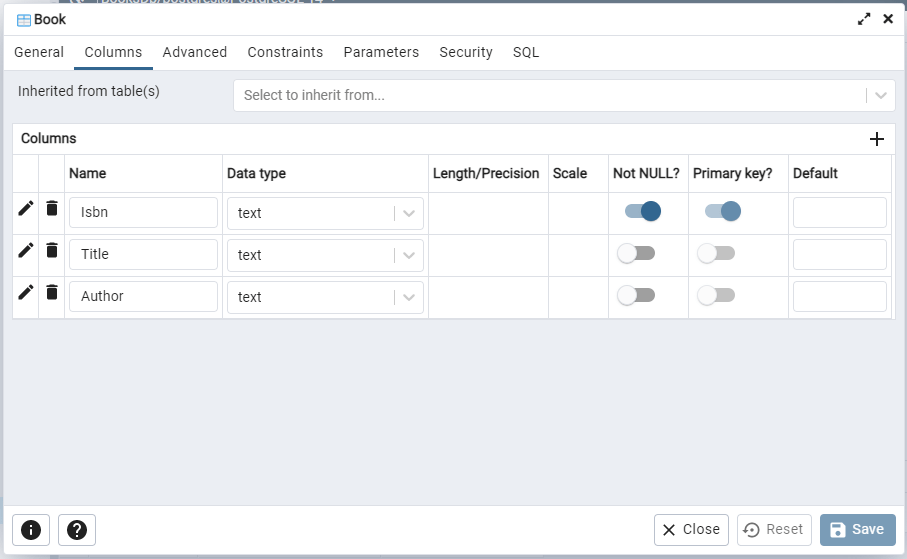
- Create a table under the database (Right click on Tables and follow the options).

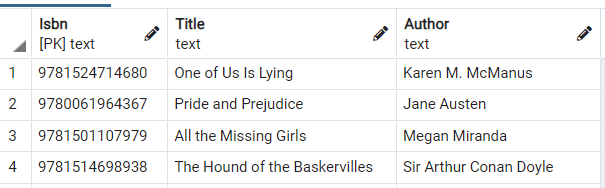
Make sure to add primary key if you need one. In our example we set ISBN as the primary key.
- Create a new Console Application project using .NET Core (in this case, version 3.1).
- Create a new class for Book entity to keep related data.
As you notice, we have define metadata for Book entity using data annotations (System.ComponentModel.DataAnnotations and System.ComponentModel.DataAnnotations.Schema).
[Table("Book")]
public class Book
{
    [Column("Isbn")]
    [Key]
    public string Isbn { get; set; }

    [Column("Title")]
    public string Title { get; set; }

    [Column("Author")]
    public string Author { get; set; }
}- Install Npgsql.EntityFrameworkCore.PostgreSQL nuget package.
Npgsql.EntityFrameworkCore.PostgreSQL is the open source EF Core provider for PostgreSQL.
You don’t need to install Microsoft.EntityFrameworkCore as Npgsql.EntityFrameworkCore.PostgreSQL behaves like any other EF Core providers. The reason is Npgsql.EntityFrameworkCore.PostgreSQL contains Microsoft.EntityFrameworkCore.
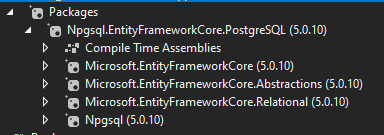
Please remember to select the correct version based on you target .NET framework version. This project has .NET 5.0 as the target framework, so the nugets installed here are compatible with .NET 5.0.
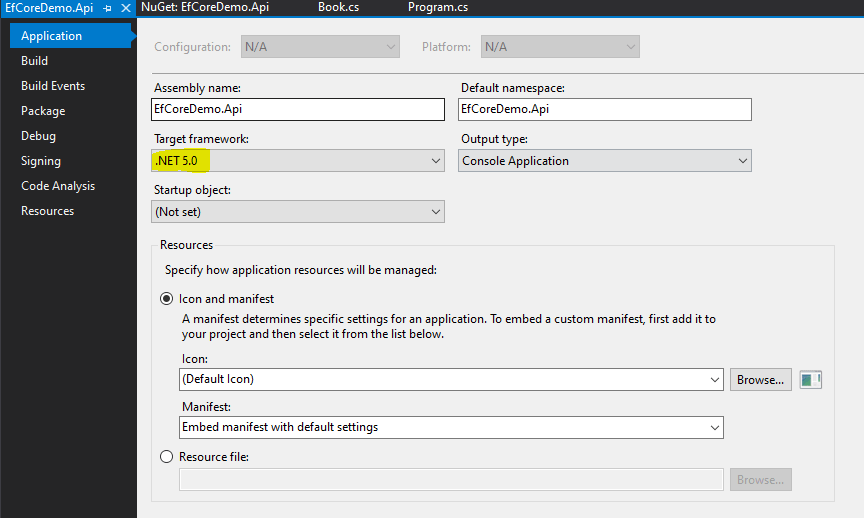
For instance, if you try to install Microsoft.EntityFrameworkCore 6.0.1 with .NET 5.0, you will get a version incompatibility error during the installation and the nuget will not be installed.
- Create a class for database context to query and save instance of book entities. This class should be derived from the DbContext class which resides in EF Core package.
The DbContext class represents a session with the database which can be used to query and save instances of your entities to a database. It provides to perform certain tasks such as,
– configuring database connection, model and relationship
– querying data
– saving data
DbContext class contain DbSet property that allows to define entities in the model. For instance, BookContext class has a DbSet property of type Book. You can define multiple properties like that for your model.
public class BookContext : DbContext
{
    private readonly string connectionString;

   public DbSet<Book> Book { get; set; }

   public BookContext(DbContextOptions<BookContext> options) : base(options)
   {
   }

   protected override void OnConfiguring(DbContextOptionsBuilder optionsBuilder)
   {
      optionsBuilder.UseNpgsql"Server=localhost;Port=5432;Database=BooksDb;User Id=john_doe;Password=xxxxxx;");
   }
}
The OnConfiguring() method allows us to select and configure the data source to be used with a context using DbContextOptionsBuilder. Please note hard-coded password is not a best practice, but we have done it here to keep everything simple and focus on the use of EF with Postgres.
The OnModelCreating() method allows us to configure the model using ModelBuilder. This included defining whether model has keys, if so what the different types of keys are, and relationship between entities. Following code indicates that the entity does not have a key column.
protected override void OnModelCreating(ModelBuilder modelBuilder)
{
        modelBuilder.Entity<Book>().HasNoKey();
}
In our example, we have defined the key column in the book class using data annotations. Instead of that, we can define the key as follows.
protected override void OnModelCreating(ModelBuilder modelBuilder)
{
        modelBuilder.Entity<Book>().HasKey(book => book.Isbn);
}
- Now you can test the manipulation of data as follows. Again… to maintain the simplicity, this code resides in Program file.
DbContext class contains behaviors to manipulate data. BookContext has derived these methods as a part of inheritance.
// Creating context object:
using var bookContext = new BookContext(new DbContextOptions<BookContext>());

// Adding a single entity:
bookContext.Add(book);
bookContext.SaveChanges();

// Adding multiple entities:
bookContext.AddRange(books);
bookContext.SaveChanges();

// Querying entity by value:
bookContext.Books.FirstOrDefault(book => book.Isbn == "9781524714680");

// Querying all exiting entities:
var books = bookContext.Books.AsQueryable().ToList();
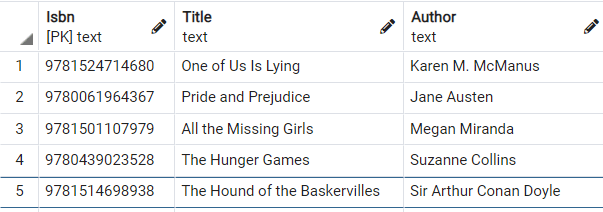
// Removing a single entity:
bookContext.Remove(new Book { Isbn = "9780439023528", Title = "The Hunger Games", Author = "Suzanne Collins" });
bookContext.SaveChanges();
// Removing a range of the existing entities:
var books = new List<Book>{ … };
bookContext.RemoveRange(books);
bookContext.SaveChanges();
 Silent Programmer